Cisco Unified CME
This guide outlines the steps to configure Cisco Unified CME to make and receive phone calls using didlogic trunks. Before placing or receiving a call, ensure you have an active phone number and a SIP account created on your didlogic account.
Components used
- Cisco Cloud Services Router 1000v with IOS XE Release 16.12.06
- Cisco Unified CME Release 12.6


Configuring SIP Trunk on Cisco Unified CME
Registering SIP Account
To receive inbound calls, you need to register your SIP Account at one of the regional didlogic gateways. Choose one that is closer to your location (e.g. sip.se.didlogic.net) and configure registrar parameters:
sip-ua
 ! Register SIP Account using its 5-digit numeric ID as username
 credentials number 39554 username 39554 password 0 <strong password> realm
sip.se.didlogic.net
 ! Configure registrar
 registrar dns:sip.se.didlogic.net expires 3600
 ! Configure gateway for outbound calls
 sip-server dns:sip.se.didlogic.net
 ! SIP transport connections will use single local port
 connection-reuse
 ! As this is PSTN connection we don't send caller name
 no remote-party-id
- For this configuration to work, DNS server should be configured on your CME.
- Authentication realm is different for each gateway and equals its hostname
- SIP Registration is carried over UDP by default. You can switch transport to TCP by using the
respective parameter in the registrar command:
registrar dns:sip.se.didlogic.net expires 3600 tcp
Once the configuration is completed, you can verify SIP Account registration using the show sip-ua register status command:
 If registration is successful, you will see yes in the reg column for your SIP Account Line.
To prevent CME from sending unnecessary SIP REGISTER requests from the IP phones, you should disable the following feature:
-
For SIP Phones:
voice register dn 1
 number 2002
 ! Disable phone DN registration via SIP Trunk
no-reg -
For SCCP Phones:
ephone-dn 10 dual-line
 ! Disable primary DN registration via SIP Trunk
 number 2001 no-reg primary
ephone-dn 11 dual-line
 ! Disable primary and secondary DNs registration via SIP Trunk
 number 2001 secondary 2003 no-reg both
Configuring Inbound Calls
For inbound calls, your SIP Account must be registered as described in the Registering SIP Account section.
Starting from Cisco IOS Release 15.1(2)T / Cisco Unified CME 8.1, the Toll Fraud Prevention feature is enabled by default to enhance the security posture of the device. To allow incoming calls from a didlogic regional gateway, add its IP Address to the trusted list in the voice service voip section:
voice service voip
 ip address trusted list
 ! Add IP Address of regional gateway sip.se.didlogic.net
 ipv4 5.150.254.205
If you configure a session target for an outgoing dial-peer in the form of an IP address, i.e., session target ipv4:5.150.254.205 you don't need to explicitly add it to the trusted list as it will be automatically allowed based on the dial-peer configuration. You can verify the current trust list by using the show ip address trusted list command.
To correctly match inbound calls and set desired preferences, the incoming dial-peer should be configured:
dial-peer voice 2000 voip
 description *** DID Logic Inbound ***
 session protocol sipv2
 session transport tcp
 ! Match dial-peer based on the called number
 incoming called-number 61272534418
 voice-class codec 1
 dtmf-relay rtp-nte
 no vad
Authenticate your CME
By default, didlogic responds 407 Proxy Authentication Required to every SIP INVITE. Configure the authentication username under the sip-ua section to support this authentication option.
sip-ua
 authentication username 39554 password 0 <your strong password> realm sip.se.didlogic.net
The actual realm specified must match the hostname of the regional didlogic you'd be routing your calls to. The list of regional gateways can be found here or under SIP Accounts in the SIP tab on the user portal.
Alternatively, you can enable IP Authentication for your SIP Account. In this case, didlogic gateways will accept all outbound calls from the IP address you specify without further authentication. To set up IP Authentication, please contact support at [email protected] and provide the public IP Address you will be sending outbound calls from.
SIP Accounts with IP Authentication enabled cannot be used as inbound destinations for DID numbers on the portal. SIP URI addresses must be used for inbound forwarding instead.
In terms of Unified CME configuration, there are no additional commands you need to add for the IP Authentication to work.
Configuring Outbound Calls
Configure global settings in the voice service voip section:
voice service voip
 ! Allow SIP Phones to dial via SIP Trunks
 allow-connections sip to sip
 ! Enable call forward and transfer for SIP Phones
 no supplementary-service sip moved-temporarily
 no supplementary-service sip refer
Define the list of preferred codecs:
voice class codec 1
 codec preference 1 g711ulaw
 codec preference 2 g711alaw
 codec preference 3 g729r8
If your users dial with a prefix (e.g. 0, 00 or 011), configure a translation profile to strip the leading digits, as all destination numbers routed to didlogic must be in E.164 format. Note that you may also need to insert the country code if numbers are dialed in the domestic format. The example below shows how you can strip the leading 00.
voice translation-rule 1000
 ! Strips 00
 rule 1 /^00/ //
 !
voice translation-profile NGN-OUT
 translate called 1000
Add dial-peers for outbound call routing:
dial-peer voice 1000 voip
 ! Outgoing dial-peer to support the 00 prefix
 description *** DID Logic Outbound ***
 ! Strip the prefix
 translation-profile outgoing NGN-OUT
 destination-pattern 00T
 session protocol sipv2
 session target sip-server
 session transport tcp
 voice-class codec 1
 dtmf-relay rtp-nte
 no vad
!
dial-peer voice 1001 voip
 ! Outgoing dial-peer for E.164 dialing
 description *** DID Logic Outbound ***
 ! For E.164 dialing with + sign
 destination-pattern +T
 session protocol sipv2
 session target sip-server
 session transport tcp
 voice-class codec 1
 dtmf-relay rtp-nte
 no vad
Session transports supported are: UDP, TCP, and TLS. Session target can also point to a selected regional gateway: session target dns:sip.se.didlogic.net or session target ipv4:5.150.254.205
Configuring Caller ID Passthrough
When you configure SIP Account settings on the didlogic portal, you normally assign one of the purchased DID numbers as the Caller ID.
If you want to use your own A-numbers and send them directly from CME, you need to contact your account manager or send an email to [email protected] requesting Caller ID passthrough activation. Note that this feature may not be available depending on individual eligibility.
Once your request is approved and the feature is enabled, you will need to remove the Caller ID assigned to your SIP Account to allow Custom Caller ID passthrough.
If there is no Caller ID associated with the SIP Account while Caller ID passthrough is disabled, your outbound calls will be passed over the public network with Anonymous Caller ID. Anonymous calls tend to be routinely deprioritized and may even be barred by carriers.
Configuring Custom Caller ID on Cisco Unified CME
By default, Cisco Unified CME will use the IP Phone DN as the Caller ID for calls via a SIP Trunk. You can rewrite the Caller ID on outgoing dial-peers using translation profiles.
Configure voice translation rule to replace internal DNs with the desired Caller ID and modify translation-profile NGN-OUT by adding a calling number translation rule:
voice translation-rule 3000
 ! Replace internal DNs with desired Caller ID
 rule 1 /.*/ /61272534418/
 !
voice translation-profile NGN-OUT
 translate calling 3000
As this translation profile is already assigned to outgoing dial-peers, you don't need to modify the associated configuration.
Setting up failover routing
To ensure continuity of business operations and protect from potential service interruption, SIP Trunk failover scenarios should be considered. In this guide, we provide configuration options for the failover of both incoming and outgoing calls.
Inbound calls failover
To protect against inbound call disruptions, we'll use dual registrars. First, let's allow CME to process incoming calls from both regional gateways:
voice service voip
 ip address trusted list
 ! Add IP Address of primary regional gateway sip.se.didlogic.net
 ipv4 5.150.254.205
 ! Add IP Address of secondary regional gateway sip.nl.didlogic.net
 ipv4 185.118.63.77
Next, configure dual registrars under the sip-ua section:
sip-ua
 ! Define SIP Account details for primary registrar
 credentials number 39554 username 39554 password 0 <SIP Account strong password> realm
sip.se.didlogic.net
 ! Define SIP Account details for secondary registrar
 credentials number 39554 username 39554 password 0 <SIP Account strong password> realm
sip.nl.didlogic.net
 ! Authentication username is used to authenticate outbound calls
 authentication username 39554 password 0 <your strong password> realm sip.se.didlogic.net
 ! Authentication username is used to authenticate outbound calls
 authentication username 39554 password 0 <your strong password> realm sip.nl.didlogic.net
 ! Configure primary registrar
 registrar 1 dns:sip.se.didlogic.net expires 3600
 ! Configure secondary registrar
 registrar 2 dns:sip.nl.didlogic.net expires 3600
Once the configuration is completed, you can verify SIP Account registration with the didlogic gateways using show sip-ua register status command:
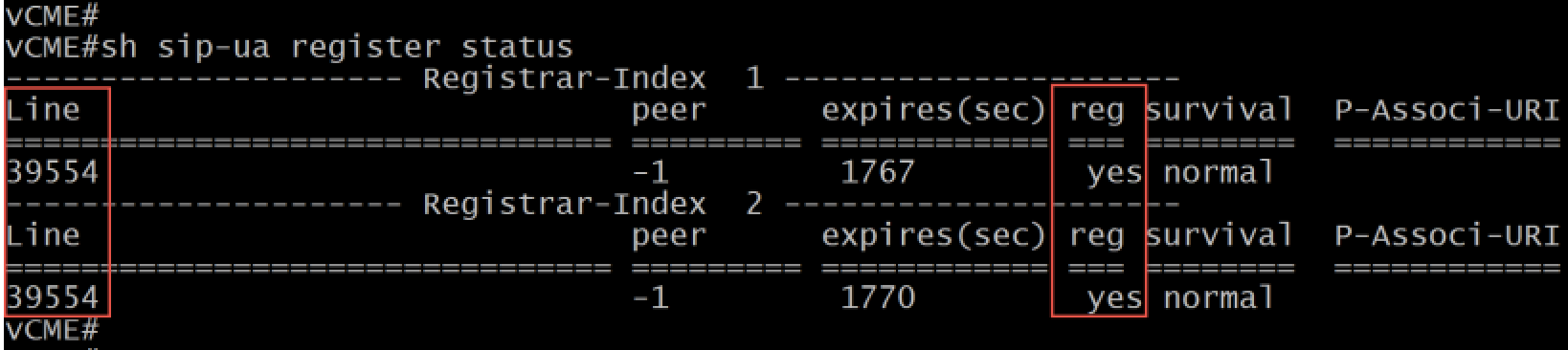 If registration is successful, you will see yes in the reg column for your SIP Account Line on both regional gateways.
Outbound calls failover
First, you must configure multiple dial-peers. Dial-peer priority is defined with the preference command. As dial-peers should point to different regional gateways, we need to specify the gateway name using the session-target command instead of the global sip-server reference:
dial-peer voice 1000 voip
 ! Outgoing dial-peer for dialing habits with prefix
 description *** DID Logic Outbound Primary ***
 ! Strip prefix for international dialing
 translation-profile outgoing NGN-OUT
! Define primary dial-peer
 preference 1
 destination-pattern 00T
 session protocol sipv2
 session target dns:sip.se.didlogic.net
 session transport tcp
 voice-class codec 1
 dtmf-relay rtp-nte
 no vad
!
dial-peer voice 1002 voip
You may want to repeat the same configuration for outgoing dial-peers with E.164 dialing.
Troubleshooting
Common issues with outbound calls
- Another typical reason for the 603 Declined is a call to the destination with the per-minute rate higher
than the Max rate set for your account. You can find your effective Max rate on the SIP tab. If you would
like to have it changed, please contact [email protected]. - Incorrect destination number format. For example, dial the full international number (E.164):
12125551212 (US), 442085000000 (UK). Dialing 2125551212 won't work. Do not dial with a leading 0, 00, or 011.
Common issues with inbound calls
- Make sure IP addresses of didlogic regional gateways are either explicitly added to the trust list under
voice service voip section or dynamically allowed via dial-peer session targets - Make sure you have a translation profile or num-exp configured to translate the incoming called number
from E.164 format to internal DN or hunt-group
Troubleshooting SIP Trunk connectivity
Apart from limits on your didlogic account, 603 Declined might be caused by the lack of active registration. Confirm SIP Account registration using show sip-ua register status command:
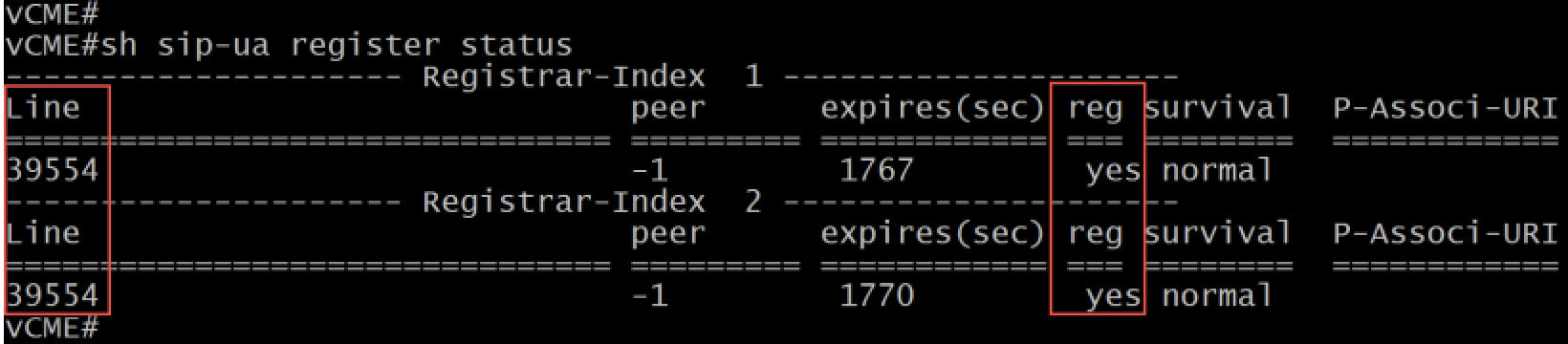
You should see SIP Account is registered with the regional gateway(s).
Verify that IP Addresses of didlogic regional gateways are allowed for incoming calls using the show ip address trusted list command:
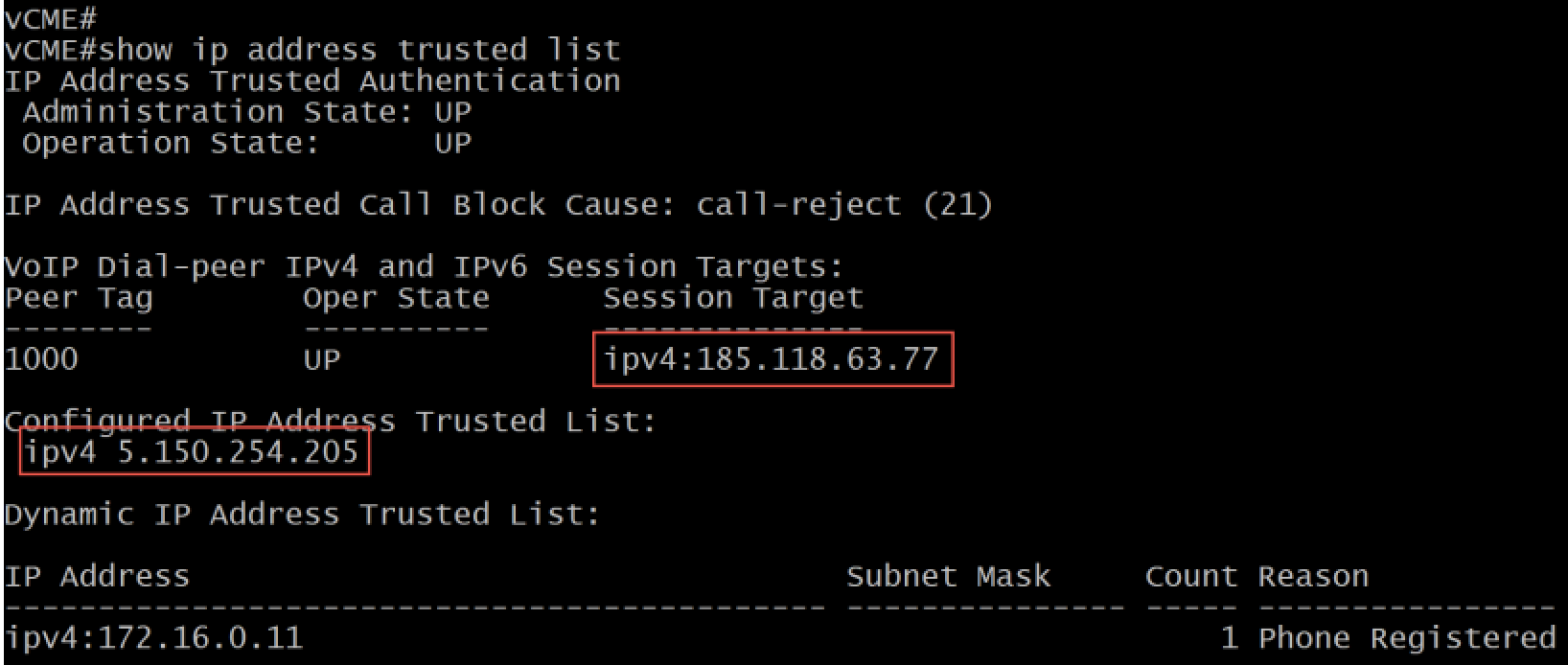
If you are still experiencing issues, enable the following debugs, make a test call, and review the debug
output:
debug voice ccapi inoutdebug ccsip messagesdebug voice translation
If you are using TCP transport, you may want to try the following command:
debug ip tcp transactions