Pipecat (WebSocket Calls)
This guide walks you through integrating a Pipecat voice bot with didlogic using WebSocket calls. Once connected, your bot can answer calls to your didlogic numbers and place outbound calls through the API, using any speech-to-text, LLM and text-to-speech services that Pipecat supports.
Prerequisites
Before starting, ensure you have:
- An active didlogic account with an available balance.
- At least one purchased DID number.
- A five-digit SIP account and a didlogic API token for outbound calls.
- A public-facing server or tunneling service like ngrok.
- API keys for speech-to-text, text-to-speech, and LLM services.
Install Pipecat
This guide starts from the project created by the Pipecat quickstart.
-
Install the Pipecat CLI and scaffold the quickstart project:
# Install the Pipecat CLI
uv tool install "pipecat-ai[cli]"
# Scaffold the quickstart project
pipecat init quickstart
# Change to the project directory
cd pipecat-quickstart/server
The scaffold places the project in a server folder, with its own pyproject.toml, .env.example and bot.py. Run all commands in this guide from that folder.
- Configure your API keys. Create your environment file:
cp .env.example .env
Open .env in your text editor and add your API keys:
DEEPGRAM_API_KEY=your_deepgram_api_key
OPENAI_API_KEY=your_openai_api_key
CARTESIA_API_KEY=your_cartesia_api_key
DIDLOGIC_API_TOKEN=your_didlogic_api_key
DIDLOGIC_SIP_ACCOUNT=your_sip_account_number
PUBLIC_WSS_URL=wss://your-tunnel-host
- Set up the virtual environment and install dependencies:
uv sync
To confirm that Pipecat itself works first, run uv run bot.py and open http://localhost:7860/client in your browser. This is the quickstart's browser bot, and it can take about 20 seconds to start. You do not need it for didlogic calls.
Edit bot.py
This is the pipeline for one call. The only didlogic-specific parts are serializer=DidlogicFrameSerializer(), add_wav_header=False (telephony audio has no WAV header; with one you get noise or silence), and the greeting logic.
"""bot.py - the Pipecat pipeline for one didlogic call (inbound or outbound)."""
import os
from loguru import logger
from pipecat.audio.vad.silero import SileroVADAnalyzer
from pipecat.frames.frames import Frame, InputTransportMessageFrame, LLMRunFrame
from pipecat.pipeline.pipeline import Pipeline
from pipecat.pipeline.runner import PipelineRunner
from pipecat.pipeline.task import PipelineParams, PipelineTask
from pipecat.processors.aggregators.llm_context import LLMContext
from pipecat.processors.aggregators.llm_response_universal import LLMContextAggregatorPair
from pipecat.processors.frame_processor import FrameDirection, FrameProcessor
from pipecat.services.cartesia.tts import CartesiaTTSService
from pipecat.services.deepgram.stt import DeepgramSTTService
from pipecat.services.openai.llm import OpenAILLMService
from pipecat.transports.websocket.fastapi import (
    FastAPIWebsocketParams,
    FastAPIWebsocketTransport,
)
from pipecat_didlogic import DidlogicFrameSerializer
INBOUND_PROMPT = (
    "You are a helpful telephone assistant. Keep your answers to one or two "
    "sentences, and speak them plainly: everything you say is read aloud."
)
OUTBOUND_PROMPT = (
    "You are calling on behalf of a shop to confirm a delivery time. Open by "
    "saying who you are and why you are calling. Keep every answer to one or two "
    "sentences, and speak them plainly: everything you say is read aloud."
)
class GreetWhenAnswered(FrameProcessor):
    """Outbound only: start talking when the customer picks up, not when the socket opens."""
    async def process_frame(self, frame: Frame, direction: FrameDirection):
        await super().process_frame(frame, direction)
        if (
            isinstance(frame, InputTransportMessageFrame)
            and frame.message.get("event") == "answered"
        ):
            logger.info("Customer answered - starting the conversation")
            await self.push_frame(LLMRunFrame())
        await self.push_frame(frame, direction)
async def run_bot(websocket, outbound: bool = False):
    """Run the bot on an accepted didlogic WebSocket connection."""
    transport = FastAPIWebsocketTransport(
        websocket=websocket,
        params=FastAPIWebsocketParams(
            audio_in_enabled=True,
            audio_out_enabled=True,
            add_wav_header=False,  # telephony audio has no WAV header
            vad_analyzer=SileroVADAnalyzer(),
            serializer=DidlogicFrameSerializer(),
        ),
    )
    stt = DeepgramSTTService(api_key=os.environ["DEEPGRAM_API_KEY"])
    llm = OpenAILLMService(api_key=os.environ["OPENAI_API_KEY"], model="gpt-4o-mini")
    tts = CartesiaTTSService(
        api_key=os.environ["CARTESIA_API_KEY"],
        voice_id="71a7ad14-091c-4e8e-a314-022ece01c121",
    )
    prompt = OUTBOUND_PROMPT if outbound else INBOUND_PROMPT
    context = LLMContext([{"role": "system", "content": prompt}])
    context_aggregator = LLMContextAggregatorPair(context)
    steps = [transport.input()]
    if outbound:
        steps.append(GreetWhenAnswered())  # must sit directly after transport.input()
    steps += [
        stt,
        context_aggregator.user(),
        llm,
        tts,
        transport.output(),
        context_aggregator.assistant(),
    ]
    task = PipelineTask(Pipeline(steps), params=PipelineParams(enable_metrics=True))
    if not outbound:
        # Inbound: the caller is already on the line, so greet straight away.
        @transport.event_handler("on_client_connected")
        async def on_client_connected(transport, client):
            await task.queue_frames([LLMRunFrame()])
    @transport.event_handler("on_client_disconnected")
    async def on_client_disconnected(transport, client):
        await task.cancel()
    await PipelineRunner(handle_sigint=False).run(task)
Why two paths? Inbound greets on connect. Outbound must not, because didlogic answers the bot's leg as soon as it has sent start, which is before the customer's phone has rung. A bot that greets then talks to an empty line and loses its opening words. GreetWhenAnswered holds the first turn until the serializer reports the answered event.
Create the server (server.py and server_utils.py)
A complete example that handles the full didlogic call flow, including both inbound and outbound examples. Use this if you want a ready-to-run setup with minimal configuration.
server.py:
"""server.py - one server for both call directions.
  wss://<host>/ws/inbound   a WebSocket destination on one of your numbers points here
  wss://<host>/ws/outbound  Click2Call dials here (a_endpoint)
  POST /call                places an outbound call
"""
import os
import httpx
import uvicorn
from dotenv import load_dotenv
load_dotenv(override=True)  # before importing bot/server_utils, which read the environment
from fastapi import FastAPI, WebSocket  # noqa: E402
from fastapi.responses import JSONResponse  # noqa: E402
from loguru import logger  # noqa: E402
from bot import run_bot  # noqa: E402
from server_utils import DialoutRequest, place_call  # noqa: E402
app = FastAPI()
@app.get("/health")
async def health():
    return {"status": "ok"}
@app.websocket("/ws/inbound")
async def inbound(websocket: WebSocket):
    await websocket.accept()
    await run_bot(websocket, outbound=False)
@app.websocket("/ws/outbound")
async def outbound(websocket: WebSocket):
    expected = os.getenv("DIDLOGIC_STREAM_TOKEN")
    if expected and websocket.headers.get("authorization") != f"Bearer {expected}":
        logger.warning("Rejected outbound stream: bad or missing bearer token")
        await websocket.close(code=1008)
        return
    await websocket.accept()
    await run_bot(websocket, outbound=True)
@app.post("/call")
async def call(request: DialoutRequest):
    try:
        return await place_call(request.b_number)
    except httpx.HTTPStatusError as error:
        status = error.response.status_code
        try:
            body = error.response.json()
        except ValueError:
            body = error.response.text
        logger.error(f"Click2Call refused the call: {status} {body}")
        return JSONResponse(status_code=status, content={"error": body})
if __name__ == "__main__":
    uvicorn.run(app, host=os.getenv("HOST", "0.0.0.0"), port=int(os.getenv("PORT", "7860")))
server_utils.py holds the Click2Call request:
"""server_utils.py - the Click2Call request that places an outbound call."""
import os
import httpx
from pydantic import BaseModel
API_BASE = os.getenv("DIDLOGIC_API_BASE", "https://didlogic.com/api/v1")
class DialoutRequest(BaseModel):
    """The number to call, E.164 digits without the leading plus."""
    b_number: str
async def place_call(b_number: str) -> dict:
    payload = {
        "a_type": "stream",
        "a_endpoint": f"{os.environ['PUBLIC_WSS_URL']}/ws/outbound",
        "sip_account": os.environ["DIDLOGIC_SIP_ACCOUNT"],
        "b_number": b_number,
    }
    stream_token = os.getenv("DIDLOGIC_STREAM_TOKEN")
    if stream_token:
        payload["stream_token"] = stream_token
    async with httpx.AsyncClient() as client:
        response = await client.post(
            f"{API_BASE}/click2call",
            json=payload,
            headers={"Authorization": f"Bearer {os.environ['DIDLOGIC_API_TOKEN']}"},
            timeout=30,
        )
    response.raise_for_status()
    return response.json()
The Click2Call fields:
| Field | Description |
|---|---|
a_type | stream: the agent leg is your WebSocket, not a phone |
a_endpoint | Your wss:// URL. didlogic checks it is reachable before placing the call |
sip_account | One of your own five-digit SIP accounts |
b_number | Who to call: E.164 digits, no leading plus |
stream_token | Optional. didlogic sends it back as Authorization: Bearer <token> when it connects |
Run the example
- For local development, use ngrok to expose your local server:
uv run bot.py
- In a second terminal, start a tunnel:
ngrok http 7860
- Copy the forwarding host and build your endpoint URL from it:
wss://<your-ngrok-host>/ws
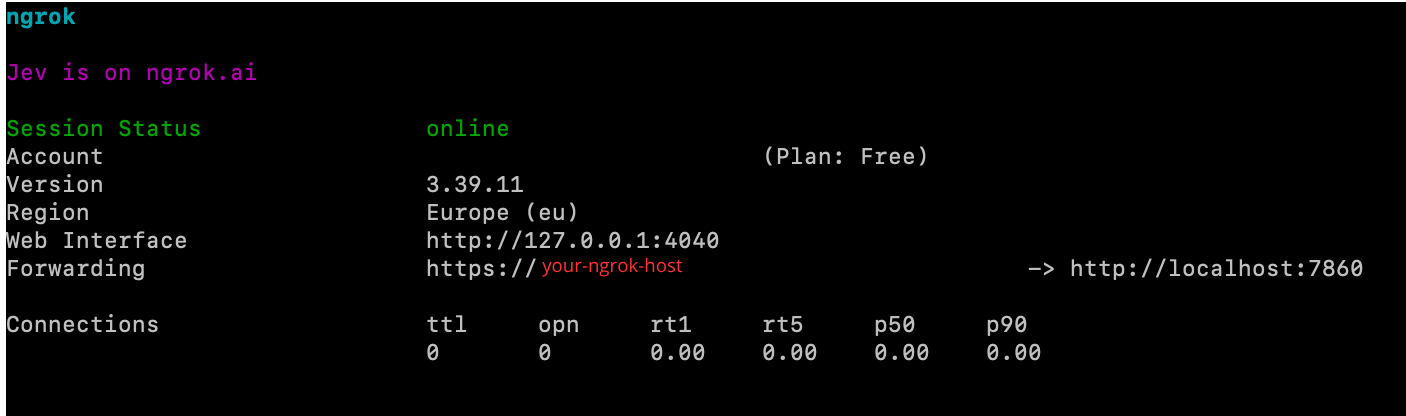
The URL must start with wss://, resolve publicly and use valid TLS. On the free ngrok plan the host changes every time ngrok restarts, so update your destination or a_endpoint whenever it does.
Inbound routing
To send calls from one of your numbers to the bot:
-
Make sure the server and tunnel from the previous section are running. didlogic checks that a destination is reachable when you save it.
-
Go to the Purchased section and click Destinations for the number you want to connect.
-
Select WebSocket as the destination type.
-
Enter your endpoint URL, for example
wss://abc123.ngrok-free.app/ws/inbound, and save the destination.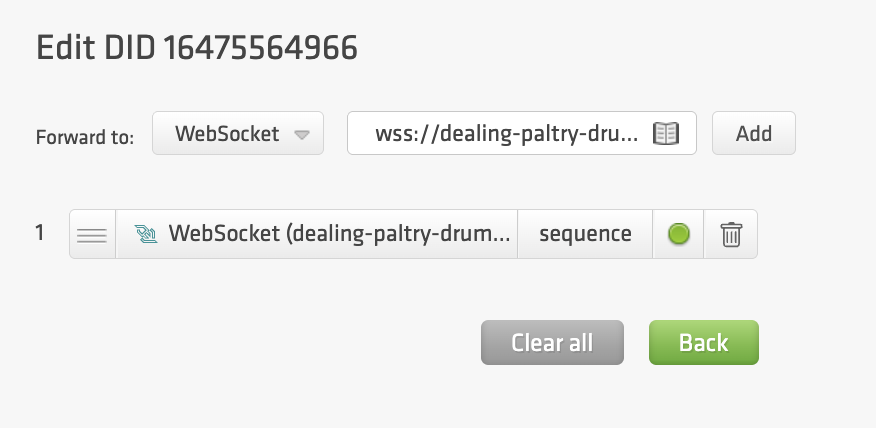
Outbound calling
Outbound calls go through the Click2Call API. didlogic connects your bot as the agent leg, then dials the customer.
- Make sure your server and tunnel are running.
- Send a Click2Call request with
a_typeset tostream:
curl -X POST https://didlogic.com/api/v1/click2call \
  -H "Authorization: Bearer $DIDLOGIC_API_TOKEN" \
  -H "Content-Type: application/json" \
  -d '{
    "a_type": "stream",
    "a_endpoint": "wss://<your-ngrok-host>/ws/outbound",
    "sip_account": "12345",
    "b_number": "12345678910"
  }'
- The response is the call in its initial
acceptedstate. To follow its progress, requestGET /api/v1/click2call/{id}. - Your server logs the start of the call straight away, then dials the customer. The bot speaks only after the customer picks up.
See WebSocket Calls for message formats, signaling payloads and event types.